
Introduction
Managing income tax can feel like navigating a maze. However, when you use the right tool, everything becomes smoother, quicker, and far less stressful. That’s exactly why the All-in-One Income Tax Calculator for the Non-Govt Employees for F.Y. 2025-26 stands out. It gives you clarity, simplifies calculations, and ensures accuracy—almost like having a personal tax guide sitting beside you.
Table of Contents
| Sr# | Headings |
| 1 | Understanding the Importance of an All-in-One Tax Calculator |
| 2 | Why Non-Govt Employees Need Smart Tax Tools |
| 3 | Key Features of the All-in-One Income Tax Calculator |
| 4 | How This Calculator Simplifies FY 2025-26 Tax Filing |
| 5 | Breakdown of Salary Components |
| 6 | Standard Deduction and Allowances |
| 7 | Old Regime vs New Regime Calculator Benefits |
| 8 | Deductions Under Chapter VI-A |
| 9 | HRA, Section 80C, and Other Common Reliefs |
| 10 | Accuracy and Time-Saving Advantages |
| 11 | Step-by-Step Guide to Using the Calculator |
| 12 | Common Mistakes Avoided with This Tool |
| 13 | Why This Calculator Is Ideal for Non-Govt Employees |
| 14 | Tips for Better Tax Planning FY 2025-26 |
| 15 | Final Thoughts |
1. Understanding the Importance of an All-in-One Tax Calculator
Using different tools for each calculation can confuse anyone. However, when you switch to an All-in-One Income Tax Calculator, you combine accuracy and convenience. This single tool handles allowances, exemptions, deductions, and both tax regimes.
2. Why Non-Govt Employees Need Smart Tax Tools
Unlike government employees, non-govt earners often deal with variable allowances, complex salary structures, and shifting deductions. Therefore, a unified calculator helps them stay aligned with tax rules.
3. Key Features of the All-in-One Income Tax Calculator
This tool stands out because it:
- Calculates income tax instantly
- Evaluates both old and new tax regimes
- Computes HRA, standard deduction, and professional tax
- Automatically checks deductions under multiple sections
It works almost like a “tax autopilot.”
4. How This Calculator Simplifies FY 2025-26 Tax Filing
The tax rules for F.Y. 2025-26 bring updated slabs, revised allowances, and new exemptions. Instead of manually verifying everything, this calculator processes your inputs and produces accurate results instantly.
5. Breakdown of Salary Components
Basic Salary
Your core earnings; the calculator uses it as the foundation of all calculations.
HRA
If you stay in rented accommodation, the tool computes the eligible HRA based on rent paid, city category, and salary.
Special Allowances
The calculator includes transport, LTA, medical, and conveyance allowances.
6. Standard Deduction and Allowances
Every salaried employee gets a standard deduction. The calculator auto-applies it without requiring manual entries. Additionally, allowances like LTA and medical reimbursement are factored correctly.
7. Old Regime vs New Regime Calculator Benefits
The calculator evaluates taxes under both regimes. Then, it recommends the more beneficial option, saving you money effortlessly.
8. Deductions Under Chapter VI-A
It helps compute:
This ensures your tax-saving investments are fully recognised.
9. HRA, Section 80C, and Other Common Reliefs
Non-Govt employees frequently claim HRA and 80C deductions. The calculator makes sure:
- HRA rules are applied properly
- Provident Fund, LIC, tuition fees, and ELSS under 80C are included
- Medical insurance premiums under 80D are accurately computed
10. Accuracy and Time-Saving Advantages
Instead of juggling spreadsheets, this tool saves hours of manual calculations. Additionally, it removes human errors, which often lead to incorrect tax payments.
11. Step-by-Step Guide to Using the Calculator
- Enter your salary structure
- Add allowances
- Input deductions
- Upload or enter investment proofs
- Compare old vs new regime results
- Download the final report
12. Common Mistakes Avoided with This Tool
Because everything is automated, you avoid:
- Miscalculating HRA
- Missing eligible deductions
- Using outdated tax slabs
- Misinterpreting rules
13. Why This Calculator Is Ideal for Non-Govt Employees
Non-govt workers often have more diverse salary components. Therefore, an all-in-one calculator ensures no earnings or deduction gets overlooked.
14. Tips for Better Tax Planning FY 2025-26
- Plan investments early
- Compare regimes every year
- Review exemptions regularly
- Keep records updated
15. Final Thoughts
The All-in-One Income Tax Calculator for the Non-Govt Employees for F.Y. 2025-26 is more than a calculator. It’s a complete tax guide that brings clarity, saves time, and offers peace of mind. Using it helps you file confidently and accurately.
FAQs
1. What makes this All-in-One Income Tax Calculator unique for F.Y. 2025-26?
It evaluates both tax regimes, applies updated rules, and includes every salary component automatically.
2. Can non-Govt employees compare old and new tax regimes?
Yes, the calculator provides a side-by-side comparison instantly.
3. Does the calculator include deductions like 80C and 80D?
Yes, it includes all major deductions under Chapter VI-A.
4. Is the tool suitable for salaried individuals with multiple allowances?
Absolutely. It handles complex salary structures accurately.
5. Do I need tax knowledge to use this calculator?
Not at all. The interface is simple, guiding you through every step.
Download Automatic Income Tax Preparation Software All-in-One in Excel (F.Y. 2025–26) for Non-Government Employees


Key Features of the Excel-Based Tax Preparation Utility
- Dual Regime Option:
You can effortlessly choose between the New or Old Tax Regime under Section 115BAC. Furthermore, the tool automatically compares both regimes to help you identify the most tax-saving option. - Customised Salary Structure:
It automatically adjusts according to your salary format, whether you belong to a Non-Government organisation. Additionally, this customisation reduces manual entry and saves valuable time. - Automatic Form 12 BA.
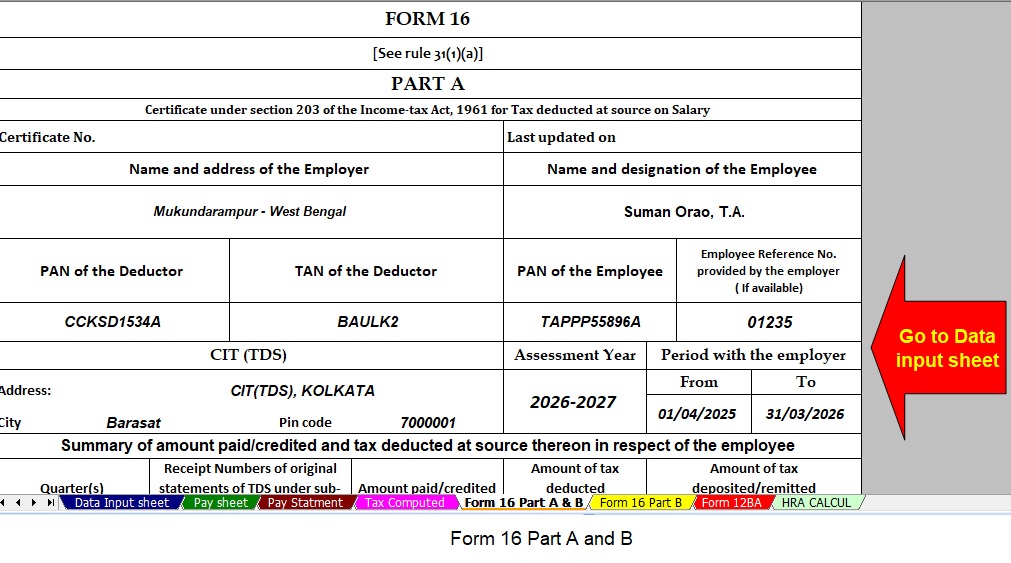
- Updated Form 16 (Part A & B and Part B):
This tool automatically generates Revised Form 16 (Part A & B and Part B) for the Financial Year 2025–26. Likewise, it ensures that your Form 16 remains compliant with the latest tax formats. - Simplified Compliance:
It ensures quick and error-free tax computation through advanced built-in formulas. Furthermore, you can confidently prepare your return with zero manual intervention, enhancing both speed and accuracy.
