Moreover, this Excel-based tool simplifies calculations and ensures accurate compliance with income tax rules.
Paying tax often feels like carrying a heavy bag on your shoulders. However, what if smart planning could lighten that load? Section 80G works exactly like a safety valve. It rewards generosity while reducing tax liability. Therefore, if you donate to eligible charities and institutions, you can also save tax legally. In this article, I will explain Section 80G with the Tax Calculator in simple words, so that both government and non-government employees can understand and apply it easily for FY 2025-26.
Table of Contents
| Sr# | Headings |
| 1 | Understanding Section 80G |
| 2 | Why Section 80G Matters Under the Old Tax Regime |
| 3 | Who Can Claim the Section 80G Deduction |
| 4 | Eligible Donations Explained |
| 5 | 50% vs 100% Deduction Categories |
| 6 | Donations with Qualifying Limit |
| 7 | Donations Without Qualifying Limit |
| 8 | Importance of Donation Receipts |
| 9 | Role of PAN and Mode of Payment |
| 10 | Section 80G for Govt Employees |
| 11 | Section 80G for Non-Govt Employees |
| 12 | Using Automatic Tax Preparation Software in Excel |
| 13 | How Form 10E Integrates with Tax Software |
| 14 | Benefits of Section 80G with Tax Calculator |
| 15 | Common Mistakes to Avoid |
1. Understanding Section 80G
Section 80G allows taxpayers to claim deductions on donations made to approved funds and charitable institutions. In other words, when you give back to society, the government gives something back to you. Moreover, this deduction applies only under the Old Tax Regime, not the New one.
2. Why Section 80G Matters Under the Old Tax Regime
While the New Tax Regime offers lower tax rates, it removes most deductions. However, the Old Tax Regime still rewards planned savings. Therefore, Section 80G becomes extremely useful. Additionally, it supports social causes while lowering taxable income.
You might also like:- Automatic Income Tax Preparation Excel-Based Software/Calculator All in One for the Maharashtra State Employees for FY 2025-26
3. Who Can Claim the Section 80G Deduction
Both government and non-government employees, salaried individuals, pensioners, and even self-employed persons can claim this deduction. However, companies cannot claim it here. Consequently, individual taxpayers benefit the most.
4. Eligible Donations Explained
Not every donation qualifies. Therefore, donations must be made only to institutions approved under Section 80G. For example, PM National Relief Fund, approved NGOs, and certain trusts qualify. Meanwhile, cash donations above ₹2,000 do not qualify.
5. 50% vs 100% Deduction Categories
Some donations qualify for 100% deduction, while others qualify for 50% deduction. For instance, the PM CARES Fund allows 100% deduction. On the other hand, donations to certain NGOs allow only 50%. Hence, understanding categories is essential.
6. Donations with Qualifying Limit
Certain donations fall under a qualifying limit of 10% of Adjusted Gross Total Income. Therefore, even if you donate more, the deduction may be restricted. Consequently, tax calculation software becomes very helpful here.
7. Donations Without Qualifying Limit
Thankfully, some donations do not have any limit. As a result, you can claim the full eligible amount. Examples include PM National Relief Fund. Thus, planning donations wisely makes a big difference.
8. Importance of Donation Receipts
Without a valid receipt, your claim may fail. Therefore, ensure the receipt contains the name, PAN of trust, amount, and registration number. Otherwise, the deduction may be rejected during scrutiny.
9. Role of PAN and Mode of Payment
Donations must be made through banking channels. Hence, cheque, UPI, or net banking is recommended. Moreover, quoting your PAN ensures proper reporting and verification.
You might also like:- Automatic Income Tax Preparation Excel-Based Software/Calculator All in One for the West Bental State Employees for FY 2025-26
10. Section 80G for Govt Employees
Government employees often rely on Form 16. Therefore, integrating Section 80G details accurately is vital. With automatic Excel tools, calculations become smooth and error-free.
11. Section 80G for Non-Govt Employees
Private employees usually manage multiple income components. Therefore, Section 80G with Tax Calculator helps consolidate data and compute deductions instantly.
12. Using Automatic Tax Preparation Software in Excel
Think of this software as a GPS for tax filing. It guides you step by step. Moreover, it auto-calculates deductions, applies limits, and reduces manual errors. Consequently, it saves time and stress.
13. How Form 10E Integrates with Tax Software
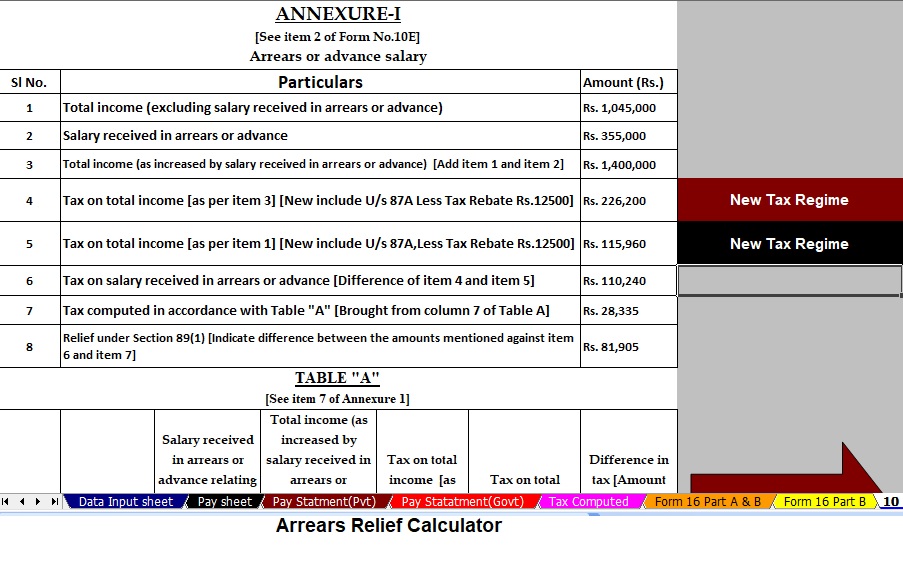
Although Form 10E is mainly for relief under Section 89(1), modern tax software integrates it seamlessly. Therefore, arrears relief and Section 80G deductions work together without confusion.
14. Benefits of Section 80G with Tax Calculator
Using Section 80G with Tax Calculator ensures accuracy. Additionally, it improves compliance, speeds up filing, and increases confidence. As a result, taxpayers avoid notices and penalties.
15. Common Mistakes to Avoid
Avoid cash donations above limits. Do not forget receipts. Also, do not claim under the New Tax Regime. Finally, always verify institution approval before donating.
Conclusion
In conclusion, Section 80G is a powerful tool under the Old Tax Regime for FY 2025-26. When combined with automatic tax preparation software in Excel, it simplifies tax planning for both government and non-government employees. Just like planting a tree gives shade later, donating today gives tax relief tomorrow. Therefore, plan wisely, donate smartly, and calculate accurately.
Frequently Asked Questions (FAQs)
- Can I claim Section 80G under the New Tax Regime?
No, Section 80G is available only under the Old Tax Regime. - Is cash donation allowed under Section 80G?
Yes, but only up to ₹2,000. Beyond that, non-cash modes are mandatory. - Do I need Form 16 to claim Section 80G?
Form 16 helps salaried employees, but you still need valid donation receipts. - Can I use Excel software for Section 80G calculation?
Yes, automatic Excel tax software calculates limits and deductions accurately. - Is Section 80G with Tax Calculator useful for pensioners?
Yes, pensioners under the Old Tax Regime can also benefit from it.
Download the All-in-One Excel-Based Income Tax Preparation Software designed specifically for Government and Non-Government (Private) Employees for F.Y. 2025-26 and A.Y. 2026-27.


This powerful Excel utility simplifies tax filing while ensuring accuracy and compliance.
Firstly, this Excel utility strictly follows the Budget 2025 guidelines and accurately calculates tax under both the New and Old Tax Regimes as per Section 115BAC.
Moreover, it uses a dedicated salary structure tailored separately for Government and Private employees, ensuring precise calculations.
Additionally, the tool automatically prepares the Income Tax Arrears Relief Calculator under Section 89(1) and generates Form 10E seamlessly for periods ranging from FY 2000-01 to FY 2025-26.
Furthermore, you can generate your income tax computation sheet instantly—just enter your data, and the software completes the rest accurately.
Meanwhile, the utility calculates the House Rent Allowance (HRA) exemption under Section 10(13A) without manual effort.
Also, it maintains a separate salary sheet within the same Excel file for better salary management.
Likewise, the software automatically prepares Form 16 Part B for FY 2025-26 in a single step.
Consequently, you save significant time and avoid calculation errors.
Therefore, the tool enhances accuracy and compliance.
Finally, this Excel utility simultaneously prepares Form 16 Part A and Part B automatically, making tax preparation faster, easier, and stress-free.
In addition, this Excel-based software reduces dependency on external tax consultants, which helps you save money every year. At the same time, it minimises manual errors by using built-in formulas and validations aligned with the latest income tax rules. As a result, you gain confidence while preparing and filing your income tax return.
Furthermore, the utility offers user-friendly data entry sheets, so even non-technical users can operate it comfortably. In contrast to manual calculation, this automated system updates figures instantly whenever you revise salary, deductions, or exemptions. Hence, you always get accurate and up-to-date results.
Similarly, the software supports better tax planning by clearly showing tax liability under both regimes, thereby helping you choose the most beneficial option. Consequently, you can make informed financial decisions well before the due date. Ultimately, this all-in-one Excel utility acts as a reliable tax companion, guiding Government and Non-Government employees step by step toward smooth, compliant,