
Introduction
Are you wondering how you can save more tax in the Financial Year 2025-26? Well, here’s some good news! The Section 80C deduction as per Budget 2025 continues to be one of the most powerful tools for every Non-Government employee to reduce their taxable income. Therefore, imagine it like a golden key that unlocks multiple doors of tax savings — from investments in PPF, ELSS, and LIC premiums to tuition fees and home loan principal repayments.
Moreover, the Automatic Income Tax Calculator All-in-One in Excel makes it incredibly easy to calculate your exact tax liability without confusion or errors. This tool, designed for Non-Government employees, helps you determine how much deduction you can claim under Section 80C while staying compliant with the latest Budget 2025 updates.
Before diving into the details, let’s explore the structured overview of this article.
Table of Contents
| Sr# | Headings |
| 1 | Understanding Section 80C Deduction as per Budget 2025 |
| 2 | Eligibility for Section 80C Deduction |
| 3 | Maximum Limit under Section 80C for F.Y.2025-26 |
| 4 | Investments Eligible under Section 80C |
| 5 | Life Insurance Premiums and 80C Deduction |
| 6 | Public Provident Fund (PPF) Benefits |
| 7 | Equity Linked Savings Scheme (ELSS) Advantage |
| 8 | Home Loan Principal Repayment Deduction |
| 9 | Tuition Fee Payments under Section 80C |
| 10 | National Savings Certificate (NSC) and Tax Benefits |
| 11 | How the Automatic Income Tax Calculator Simplifies Tax Planning |
| 12 | Step-by-Step Guide to Using the Calculator |
| 13 | Section 80C vs 80CCD(1B): Key Differences |
| 14 | Common Mistakes to Avoid While Claiming 80C Deductions |
| 15 | Final Thoughts and Tax-Saving Strategies for 2025-26 |
| 16 | FAQs on Section 80C Deduction as per Budget 2025 |
1. In other words, Understanding Section 80C Deduction as per Budget 2025
To begin with, Section 80C is the most popular provision under the Income Tax Act, 1961, that allows individuals to reduce their taxable income by investing in approved schemes. As per the Budget 2025, the government retained this section to encourage savings and long-term financial discipline.
Think of it as your umbrella during a rainy day — protecting your income from heavy taxation while fostering a habit of systematic investment.
2. Therefore, Eligibility for Section 80C Deduction
Interestingly, Section 80C applies not just to salaried individuals but also to Hindu Undivided Families (HUFs). However, Non-Government employees find this section especially beneficial because most of their income is taxable under the old regime.
If you fall under this category, you can start claiming deductions for investments and payments that meet the government’s approved list.
3. In other words, the Maximum Limit under Section 80C for F.Y.2025-26
The maximum deduction limit under Section 80C for F.Y.2025-26 remains ₹1,50,000. This means that any combination of eligible investments up to this amount will be deductible from your total taxable income.
Additionally, combining this with Section 80CCD(1B) (for NPS contributions) can further enhance your savings by an extra ₹50,000. Therefore, the total deduction can reach ₹2,00,000 — quite a significant amount!
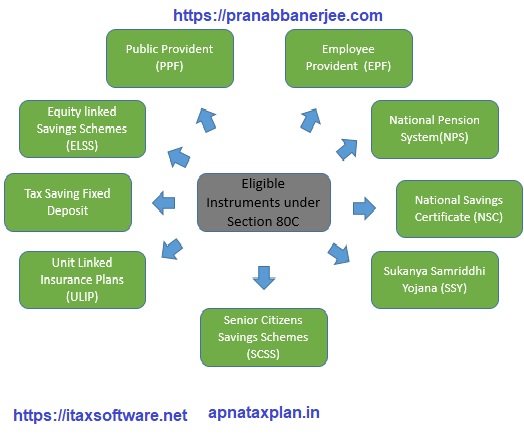
4. However, Investments Eligible under Section 80C
Under this section, you can invest in multiple instruments such as:
- Public Provident Fund (PPF)
- Employee Provident Fund (EPF)
- Life Insurance Premiums (LIC)
- National Savings Certificate (NSC)
- Equity Linked Savings Schemes (ELSS)
- Five-Year Fixed Deposits
- Tuition Fees for Children
- Home Loan Principal Repayment
Above all, each of these offers not only tax savings but also financial security. The trick lies in choosing the right combination that aligns with your financial goals.
5. Life Insurance Premiums and 80C Deduction
When you pay your LIC premium, you’re not just protecting your family — you’re also saving tax. Premiums paid for self, spouse, or children qualify under Section 80C.
However, ensure that the premium does not exceed 10% of the sum assured for policies issued after April 1, 2012, to remain eligible. Consequently, this small check helps you maximise benefits while staying compliant.
6. Public Provident Fund (PPF) Benefits
The Public Provident Fund (PPF) remains a timeless favourite among Indian taxpayers. It not only qualifies for deduction under Section 80C but also offers tax-free interest and maturity — making it a true “triple benefit” scheme.
Moreover, you can invest as little as ₹500 or as much as ₹1.5 lakh annually. With its 15-year lock-in period, it’s perfect for long-term savers aiming for steady returns.
7. Equity Linked Savings Scheme (ELSS) Advantage
If you prefer market-linked growth, ELSS mutual funds are your go-to option. They come with a short lock-in period of three years — the lowest among all 80C options — and offer potential for higher returns.
Additionally, investing in ELSS helps balance tax savings with wealth creation. Isn’t it a smart two-in-one benefit?
8. In addition, Home Loan Principal Repayment Deduction
Owning a home isn’t just an emotional milestone — it’s also a tax-saving opportunity. The principal portion of your home loan EMI qualifies for deduction under Section 80C, provided the property isn’t sold within five years of possession.
As a result, you enjoy both a sense of ownership and a handsome tax deduction.
9. Tuition Fee Payments under Section 80C
Education expenses can be heavy on your pocket, but here’s a relief: tuition fees paid for up to two children qualify for a deduction under Section 80C. This means your commitment to your children’s future directly contributes to your tax savings.
10. National Savings Certificate (NSC) and Tax Benefits
Another traditional investment, the NSC, is backed by the government and provides fixed returns. Moreover, the interest earned on NSC is reinvested and qualifies again for 80C deduction until maturity.
That’s double the benefit — safety and compounding tax savings.
11. How the Automatic Income Tax Calculator Simplifies Tax Planning
After that, in today’s fast-paced world, manual calculations can be both time-consuming and error-prone. This is where the Automatic Income Tax Calculator All-in-One in Excel comes in handy.
It automatically computes your taxable income, deductions, and tax liability, ensuring that you claim every rupee you deserve under Section 80C deduction as per Budget 2025.
12. Above all, Step-by-Step Guide to Using the Calculator
To use the calculator effectively:
- Download the Automatic Income Tax Calculator All-in-One in Excel from the link below
- Enter your income details, allowances, and deductions.
- Input your investments under Section 80C.
- Review the summary — it instantly displays your total deduction and net tax liability.
This intuitive process makes tax computation almost effortless.
13. Section 80C vs 80CCD(1B): Key Differences
While both aim at tax savings, there’s a thin line between them:
- Section 80C includes multiple investment avenues.
- Section 80CCD(1B) applies specifically to the National Pension System (NPS)
Thus, by combining both, you can enjoy a broader deduction range and strengthen your retirement corpus simultaneously.
14. Similarly, Common Mistakes to Avoid While Claiming 80C Deductions
Even though Section 80C is popular, many taxpayers commit avoidable errors, such as:
- Claiming deductions for non-eligible investments.
- Exceeding the total limit of ₹1.5 lakh.
- Forgetting to retain investment proofs.
To avoid last-minute confusion, it’s wise to use the Automatic Calculator and cross-check every entry before filing your return.
15. Final Thoughts and Tax-Saving Strategies for 2025-26
In conclusion, the Section 80C deduction as per Budget 2025 remains a cornerstone for every taxpayer, especially Non-Government employees. Whether you prefer the safety of PPF or the growth of ELSS, the key is to invest early and consistently.
With the help of the Automatic Income Tax Calculator All in One, you can seamlessly plan, calculate, and optimise your tax savings for the Financial Year 2025-26.
Remember — smart tax planning today means a more secure tomorrow.
Frequently Asked Questions (FAQs)
- What is the maximum limit for Section 80C deduction in F.Y.2025-26?
The maximum limit is ₹1,50,000 under Section 80C deduction as per the Budget 2025. - Can Non-Government employees claim Section 80C benefits?
Yes, Non-Government employees can claim full benefits by investing in eligible instruments like PPF, ELSS, and LIC. - Is ELSS better than PPF for Section 80C deduction?
Both are good — ELSS offers higher returns with some risk, while PPF provides guaranteed returns with tax-free interest. - Can tuition fees for children be claimed under Section 80C?
Yes, tuition fees paid for up to two children are eligible under this section. - How does the Automatic Income Tax Calculator help in tax filing?
It automatically calculates deductions and tax liability, helping you save time and avoid errors while filing your return.
Download Automatic Income Tax Preparation Software All in One in Excel for Non-Government Employees (F.Y. 2025-26)


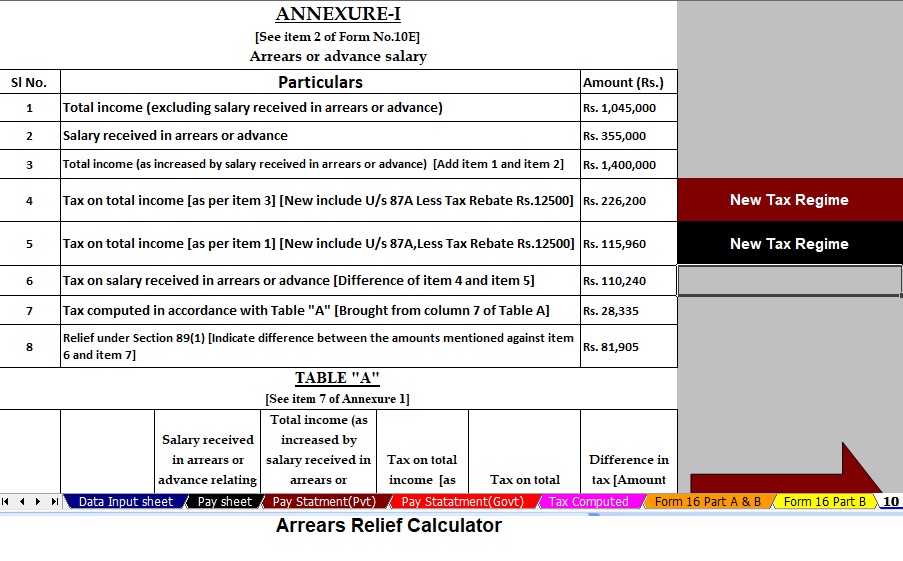

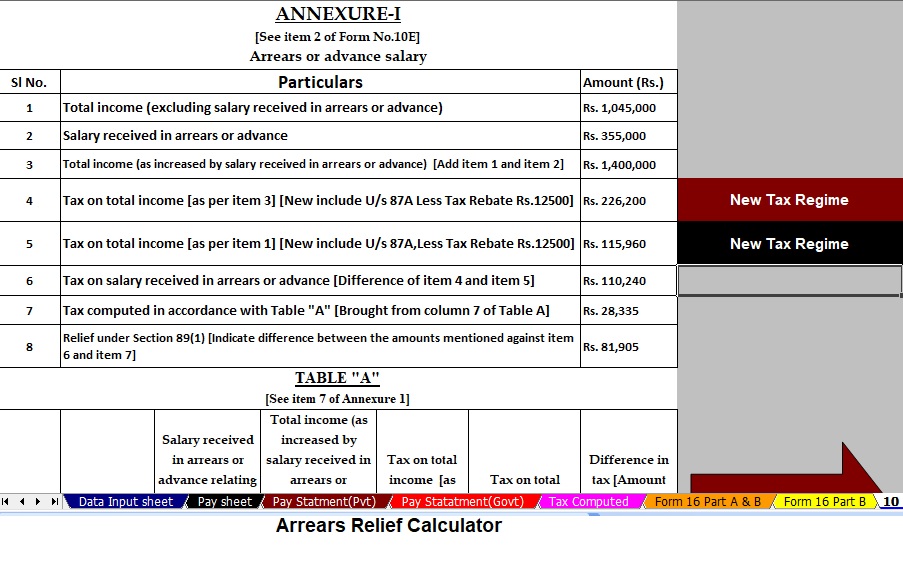
Now, you can instantly download the Automatic Income Tax Preparation Software All-in-One in Excel, designed especially for Non-Government employees for the Financial Year 2025-26. This advanced Excel-based utility simplifies your entire tax computation process while ensuring complete accuracy and compliance with the latest Budget 2025 updates.
Moreover, it automates every step of your salary and tax preparation, allowing you to save time, reduce effort, and eliminate manual errors effortlessly. With this tool, you can manage your income tax planning efficiently, while staying updated with every new tax rule.
Key Features of This Excel Utility
✅ Prepares Your Tax Computation Sheet Instantly as per Budget 2025
This software instantly prepares your complete tax computation sheet in accordance with the latest provisions of Budget 2025. As a result, you can stay fully compliant while ensuring that every calculation remains precise, transparent, and up to date.
✅ Includes an Inbuilt Salary Structure for Non-Government Employees
It comes preloaded with a well-defined salary structure tailored for Non-Government employees. Therefore, you can easily input your income details without wasting time creating complex salary formats manually. In other words, the software does the heavy lifting for you.
✅ Automatically Generates Your Salary Sheet
With just a few clicks, the utility automatically generates your complete salary sheet. Consequently, you no longer need to worry about manual data entry or formula mistakes. This automation ensures that your salary details remain organised, accurate, and ready for review at any time.
✅ Calculates HRA Exemption Automatically under Section 10(13A)
The tool intelligently calculates your House Rent Allowance (HRA) exemption as per Section 10(13A). It carefully considers your salary amount, rent paid, and city classification to determine the accurate exemption amount. Hence, you can be confident that your HRA claim follows every rule precisely and correctly.
✅ Prepares Form 12BA Automatically for the Value of Perquisite
In addition, the software automatically generates Form 12BA, which details the value of perquisites. This automation not only ensures accuracy but also saves you the hassle of manually computing perquisite values.
✅ Generates Form 16 Part A and Part B Automatically
The utility automatically generates Form 16 Part A and Part B with complete accuracy. Thus, you can easily issue Form 16 to your employees or file your own income tax returns confidently. Everything you need is generated within minutes — no manual formatting required.
✅ Creates Automatic Form 16 Part B Separately
Moreover, it creates a separate Form 16 Part B automatically, ensuring your tax documentation is complete, professional, and ready for submission. This additional feature helps you maintain proper records while avoiding last-minute stress during tax filing season.
In conclusion,
In summary, the Automatic Income Tax Preparation Software All-in-One in Excel acts as your personal digital tax assistant for the Financial Year 2025-26. It ensures that your tax computation remains smooth, accurate, and fully compliant with the latest Income Tax Rules, including updates under Section 115BAC of the Budget 2025.
By automating everything — from salary calculation to Form 16 generation — this Excel tool empowers every Non-Government employee to handle tax preparation with confidence, clarity, and convenience.
Why Choose the Automatic Income Tax Preparation Software All-in-One in Excel?
Undoubtedly, tax filing can often feel complex and time-consuming. However, this Automatic Income Tax Preparation Software All-in-One in Excel eliminates the confusion. By offering step-by-step automation, it allows every Non-Government employee to prepare their income tax return quickly and confidently.
Furthermore, since this software operates in Microsoft Excel, it’s both lightweight and user-friendly. You don’t need to install any heavy programs or rely on internet connectivity — simply download the Excel utility, open it, and start entering your income and deduction details.
In addition, the calculator follows the latest Budget 2025 provisions, ensuring your data and calculations are perfectly aligned with the most recent tax laws and Section 115BAC regulations. As a result, you save valuable time while achieving complete compliance.
How This Excel Utility Helps in Section 80C Deduction Planning
Interestingly, this software doesn’t just compute your total taxable income; it also assists you in claiming maximum deductions under Section 80C as per Budget 2025.
For example, when you enter your investment details — such as LIC premiums, PPF contributions, or ELSS mutual fund investments — the tool automatically calculates the eligible deduction limit up to ₹1.5 lakh. Consequently, you gain an immediate understanding of your tax-saving potential.
Moreover, it provides instant updates on how your total tax liability changes as you increase or decrease your investment amount. This real-time visibility helps you make smarter financial decisions before the financial year ends.
Comprehensive Automation: From Input to Final Report
Unlike manual spreadsheets, this Excel utility handles the entire process seamlessly — from salary input to final tax report generation. Here’s how it works step by step:
- Enter Basic Details – You simply start by adding your name, PAN, designation, and financial year.
- Input Salary Structure – The built-in salary format automatically categorises components like basic pay, DA, HRA, and allowances.
- Add Deductions – You can enter all your deductions under Section 80C, 80CCD(1B), and 80D, among others.
- Auto-Calculate Tax – The software instantly computes your total income, exemptions, and payable tax as per Budget 2025.
- Generate Forms Automatically – Within seconds, it creates Form 16, Form 12BA, and even salary sheets, ready for submission or sharing.
Through this automated workflow, you not only reduce errors but also enhance efficiency and compliance.
Transitioning from Manual to Automatic Tax Filing
Traditionally, Non-Government employees spent hours preparing salary sheets manually, adjusting formulas, and verifying calculations. Fortunately, this Automatic Income Tax Preparation Software in Excel has revolutionised that process.
Now, instead of juggling numbers, you can focus on what truly matters — reviewing your finances and planning for the future. Additionally, by automating the tedious aspects of computation, the tool minimises human errors, which often lead to penalties or incorrect returns.
In other words, this software turns a complicated task into a smooth, guided experience — almost like having a virtual tax assistant sitting right on your desktop.
Budget 2025 Updates Integrated into the Software
Another major advantage of using this software is its integration with the latest Budget 2025 updates. The government introduced several important tax provisions that directly impact Non-Government employees, and this tool already reflects those changes.
For instance, it supports:
- Revised Section 115BAC slab rates (for the new regime).
- Section 80C deductions for investments up to ₹1.5 lakh.
- Standard deduction and other permissible exemptions.
- Automatic comparison between old and new tax regimes.
Hence, you can decide instantly which regime benefits you more — the old or the new — without performing manual calculations.
Advantages of Using Automatic Income Tax Software
Let’s look at the key reasons why thousands of Non-Government employees prefer this Excel-based tax preparation tool:
- ✅ Time Efficiency: It performs all computations instantly.
- ✅ Accuracy: Eliminates human error and ensures precise tax results.
- ✅ Flexibility: Works offline, anytime, anywhere.
- ✅ Clarity: Displays detailed breakdowns of income, deductions, and exemptions.
- ✅ Compliance: Always updated as per the latest Income Tax Rules and Budget 2025 provisions.
Additionally, since it’s built in Excel, even users with basic computer knowledge can operate it easily without needing technical assistance.
Enhancing Transparency and Confidence
Moreover, this tool enhances transparency throughout the tax filing process. By allowing you to view every calculation in real time, it ensures you always know how your tax amount is derived.
This visibility builds trust and confidence, particularly when submitting your returns or providing documents to auditors or employers. And because the forms it generates — such as Form 16 and Form 12BA — are structured according to Income Tax Department formats, you can submit them without modification.
Practical Example: How the Tool Works
Let’s take a practical scenario:
Suppose you are a Non-Government employee with a gross salary of ₹7,00,000 annually. You invest ₹1,50,000 under Section 80C (PPF + LIC) and pay ₹25,000 under Section 80D (Health Insurance).
When you enter these figures in the Excel utility, it instantly:
- Deducts ₹1,50,000 under 80C and ₹25,000 under 80D.
- Calculates your taxable income as ₹5,25,000.
- Applies the latest Budget 2025 slab rates.
- Shows your tax payable and rebate under Section 87A if eligible.
Therefore, what earlier took hours of manual effort now takes just a few minutes — with total accuracy.
Security and Reliability of the Excel Tool
Security is another important factor. Since the Automatic Income Tax Preparation Software All-in-One runs offline, your data remains stored securely on your computer. You don’t have to upload your salary details or personal data to any online platform.
Thus, it protects your financial information from unauthorised access while maintaining full transparency. In addition, you can back up or export your sheets anytime for record-keeping.
Final Thoughts
In essence, the Automatic Income Tax Preparation Software All-in-One in Excel for Non-Government Employees (F.Y. 2025-26) is more than just a calculator — it’s a complete tax management solution. It integrates automation, accuracy, and compliance into one simple tool that anyone can use.
By leveraging this Excel utility, you not only streamline your tax preparation but also ensure that every Section 80C deduction as per Budget 2025 is applied correctly and efficiently.
So, why wait until the last date of filing? Download this all-in-one Excel software today and experience a faster, smarter, and error-free way to prepare your income tax for the Financial Year 2025-26.

