Filing income tax often feels like walking through a maze, doesn’t it? However, things are changing rapidly. Today, with the Automatic Income Tax Preparation Software/Calculator All in One in Excel, tax calculation becomes as smooth as driving on a well-marked highway. Whether you are a Government employee or a Non-Government employee, this Excel-based solution simplifies tax planning, calculation, and compliance for FY 2025-26. Moreover, instead of juggling multiple tools, you get everything in one place. So, let’s explore why this Excel utility is becoming the first choice for the general public.
Table of Contents
| Sr# | Headings |
| 1 | What Is Automatic Income Tax Preparation Software in Excel |
| 2 | Why Excel Is Still the Best Choice |
| 3 | Who Can Use This Income Tax Calculator |
| 4 | Key Features of the All-in-One Excel Utility |
| 5 | Benefits for Government Employees |
| 6 | Benefits for Non-Government Employees |
| 7 | New Tax Regime vs Old Tax Regime Comparison |
| 8 | Deductions and Exemptions Covered |
| 9 | How the Calculator Ensures Accuracy |
| 10 | Ease of Use for Beginners |
| 11 | Time-Saving Advantages |
| 12 | Data Security and Privacy |
| 13 | How to Download and Use the Software |
| 14 | Common Mistakes This Tool Helps Avoid |
| 15 | Why This Tool Is Essential for FY 2025-26 |
1. What Is Automatic Income Tax Preparation Software in Excel
Simply put, Automatic Income Tax Preparation Software in Excel is a smart, formula-driven Excel utility that calculates your tax automatically. You just enter your income, deductions, and exemptions. Then, almost instantly, the final tax liability appears. In other words, it acts like a digital accountant living inside your spreadsheet. Moreover, because it uses pre-verified formulas, accuracy remains consistent every time. Consequently, manual calculations and guesswork disappear.
2. Why Excel Is Still the Best Choice
Although many online tax calculators exist, Excel continues to dominate. First, Excel feels familiar. Second, it works offline. Third, it allows full customization. Additionally, unlike web portals, Excel gives you complete control over your data. Therefore, privacy improves. Furthermore, flexibility increases. As a result, Excel remains reliable, practical, and trusted by millions year after year.
3. Who Can Use This Income Tax Calculator
Interestingly, this Excel-based tax calculator suits almost everyone. Whether you are a Government employee, a private sector professional, or even a pensioner, this tool works seamlessly. Moreover, beginners find it easy, while experienced users appreciate its depth. Hence, no matter your background, this calculator adapts effortlessly to your needs.
4. Key Features of the All-in-One Excel Utility
The All-in-One Excel Utility stands out because of its rich feature set.
Key highlights include:
- Automatic tax calculation
- Old and New tax regime comparison
- Built-in deductions and exemptions
- User-friendly layout
- Instant updates on every entry
Additionally, totals refresh automatically. Therefore, calculation errors reduce dramatically. Consequently, confidence rises with every figure you see.
5. Benefits for Government Employees
For Government employees, this tool feels like a blessing in disguise. It considers standard deduction, HRA, TA, DA, and other allowances accurately. Moreover, it aligns smoothly with Form 16 preparation. As a result, salary-based tax planning becomes systematic. Therefore, compliance improves, and stress reduces significantly.
6. Benefits for Non-Government Employees
On the other hand, Non-Government employees enjoy unmatched flexibility. They can add incentives, bonuses, commissions, and perks with ease. Besides that, Chapter VI-A deductions calculate automatically. Consequently, time savings increase, and manual follow-ups decrease. Hence, private employees gain both speed and simplicity.
7. New Tax Regime vs Old Tax Regime Comparison
Choosing between tax regimes often feels confusing. However, this Excel tool simplifies the decision. It compares Old vs New Tax Regime side by side. As a result, you instantly see which option saves more tax. Therefore, instead of guessing, you decide logically and confidently.
8. Deductions and Exemptions Covered
This calculator supports all major deductions and exemptions such as 80C, 80D, 80CCD(1B), HRA, LTA, and more. Additionally, it follows FY 2025-26 rules precisely. Hence, compliance remains intact. Meanwhile, savings maximize without missing eligible benefits.
9. How the Calculator Ensures Accuracy
Accuracy matters more than speed. Thankfully, Excel formulas remain consistent. Moreover, once tested, they rarely fail. Consequently, every calculation stays reliable. Therefore, the risk of incorrect tax computation drops sharply. In short, accuracy becomes automatic.
10. Ease of Use for Beginners
Are you worried about complexity? Don’t be. This Excel utility features a clean layout. Furthermore, step-by-step input sections guide users naturally. Thus, even first-time users feel comfortable. Learning becomes smooth, not overwhelming.
11. Time-Saving Advantages
Time equals money. This tool respects both. Instead of spending hours on manual calculations, you finish everything in minutes. Therefore, you focus more on planning and less on number crunching. As a result, productivity improves instantly.
12. Data Security and Privacy
Unlike online portals, Excel files stay on your system. Hence, your personal and financial data remains private. Moreover, there’s no need to upload sensitive information online. Therefore, peace of mind comes built-in.
13. How to Download and Use the Software
Downloading is straightforward. After download, open the Excel file, enable macros if required, and start entering details. Consequently, results appear instantly. No complicated setup. No extra steps. Just simple, smooth usage.
14. Common Mistakes This Tool Helps Avoid
Manual calculations often lead to mistakes like missed deductions or wrong regime selection. However, this Excel calculator highlights such issues early. Hence, errors reduce automatically. Therefore, accuracy improves without extra effort.
15. Why This Tool Is Essential for FY 2025-26
Tax rules evolve every year. Therefore, using an updated tool matters. This Automatic Income Tax Preparation Software in Excel aligns perfectly with FY 2025-26 regulations. As a result, it becomes essential—not optional—for accurate and stress-free tax filing.
Conclusion
To sum up, the Automatic Income Tax Preparation Software/Calculator All-in-One in Excel acts like a trusted guide through the complex tax landscape. It simplifies calculations, saves time, ensures accuracy, and protects your data. Therefore, instead of worrying, you calculate with clarity and confidence for FY 2025-26.
FAQs
- Is this Excel tax calculator suitable for beginners?
Yes, it uses a simple layout with guided inputs, making it beginner-friendly. - Can Government and Non-Government employees use the same Excel file?
Absolutely, the calculator supports both categories seamlessly. - Does the tool compare old and new tax regimes automatically?
Yes, it provides a clear side-by-side comparison instantly. - Is my data safe in Excel-based income tax software?
Yes, since data remains offline, privacy and security stay intact. - Is this calculator updated for FY 2025-26 rules?
Yes, it fully complies with FY 2025-26 income tax regulations.
Download Automated Income Tax Preparation Excel-Based Software All in One for Government and Non-Government (Private) Employees for FY 2025-26 and AY 2026-27 U/s 115BAC


Features of This Excel Utility:
- Firstly, this Excel utility accurately prepares your income tax as per your selected option under Section 115BAC; therefore, it ensures correct tax computation, moreover, it removes confusion, additionally, it simplifies compliance, and consequently, it helps you choose the right tax regime with confidence.
- Secondly, this Excel utility includes all amended Income Tax sections as per Budget 2025; in other words, it stays updated. Furthermore, it reflects the latest rules; besides, it avoids outdated provisions, and as a result, users always calculate tax as per the current law.
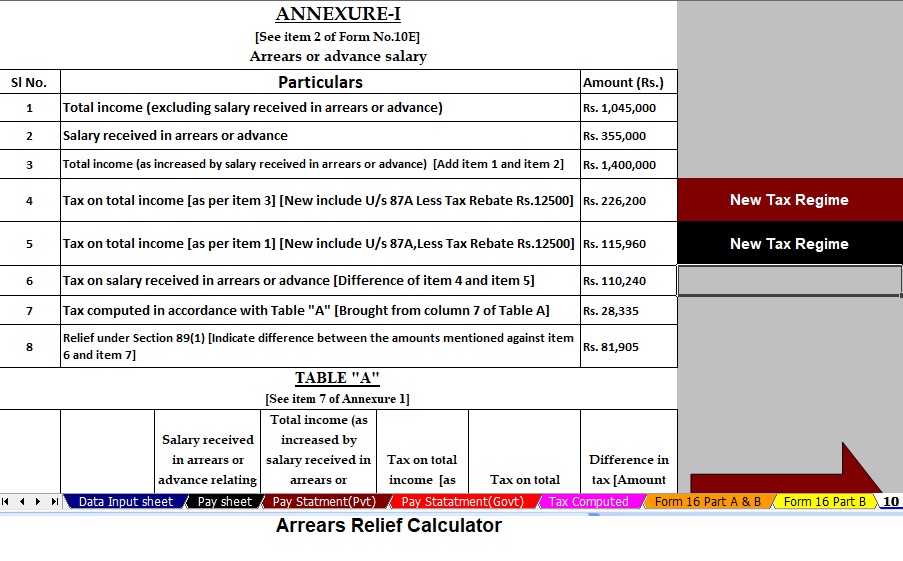
- Thirdly, this utility automatically calculates Income Tax Arrears Relief under Section 89(1) along with Form 10E from FY 2000-01 to FY 2025-26; not only that, it uses updated logic, more importantly, it reduces manual work, accordingly, it saves time, and ultimately, it ensures accurate relief computation.
- Next, the Excel software automatically calculates House Rent Allowance (HRA) exemption under Section 10(13A); therefore, it avoids manual errors, meanwhile, it applies correct limits, similarly, it follows tax rules, and hence, it delivers reliable exemption results.
- Moreover, this utility creates an individual salary structure as per Government and Private sector salary patterns; for example, it supports different pay components, additionally, it adapts to organization policies, likewise, it remains flexible, and thus, it suits every employee category.
- Furthermore, the Excel utility generates an individual salary sheet automatically; as a result, salary details remain organised, calculations stay transparent, in addition, record-keeping becomes easier, and thereby, payroll clarity improves.
- Similarly, this software prepares an individual tax computation sheet; therefore, it shows taxable income clearly, besides, it displays deductions properly, on the other hand, it reduces dependency on manual calculations, and overall, it improves tax understanding.
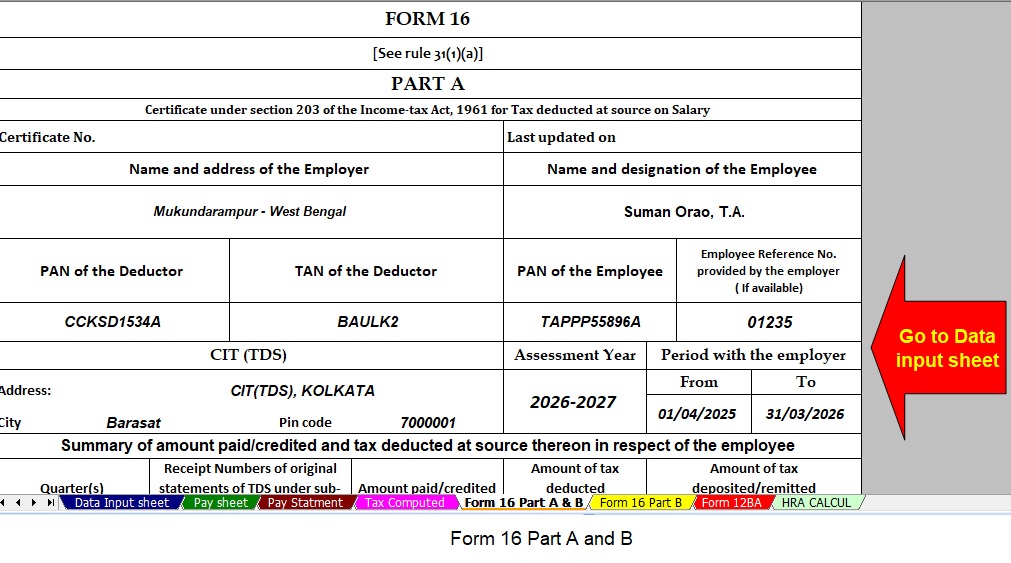
- In addition, the utility automatically prepares revised Income Tax Form 16 Part A & B for FY 2025-26; consequently, employers save effort, meanwhile, employees get accurate forms, moreover, compliance improves, and hence, documentation becomes hassle-free.
- Likewise, the Excel utility automatically generates revised Form 16 Part B for FY 2025-26; as a consequence, detailed tax computation is ready instantly, further, it aligns with Form 16 standards, thereafter, verification becomes simple, and finally, reporting accuracy increases.
- Lastly, this Excel utility automatically converts numeric amounts into words without using any Excel formula; surprisingly, it works instantly, in fact, it avoids complex functions, otherwise, manual typing would be required, and therefore, it enhances ease of use and professionalism.