Introduction
The government’s decision to increase the Standard Deduction to ₹75,000 for salaried individuals and pensioners brings welcome relief, doesn’t it? Moreover, when you pair this update with an Automatic Income Tax Calculator/Software in Excel All-in-One, tax filing for FY 2025-26 becomes smoother, faster, and stress-free. Just as a well-organised cupboard makes mornings easier, an automated Excel tool makes your tax season surprisingly simple.
Table of Contents
| Sr# | Headings |
| 1 | Understanding the Increased Standard Deduction |
| 2 | Why This Change Matters for You |
| 3 | Impact of Standard Deduction on Taxable Income |
| 4 | Benefits for Pensioners in FY 2025-26 |
| 5 | How the Automatic Tax Calculator Helps |
| 6 | Features of the All-in-One Excel Tax Software |
| 7 | How to Use the Excel Tax Calculator Step-by-Step |
| 8 | Why Salaried Employees Prefer Automation |
| 9 | Difference Between Old and New Regime Benefits |
| 10 | Example Calculations for Easy Understanding |
| 11 | Common Mistakes in Manual Tax Calculations |
| 12 | Why Standard Deduction Boosts Savings |
| 13 | Key Income Tax Changes for FY 2025-26 |
| 14 | Practical Tips to Maximise Tax Savings |
| 15 | Final Thoughts on Smart Tax Planning |
1. Understanding the Increased Standard Deduction
The Income Tax Standard Deduction has been enhanced to ₹75,000, and this directly reduces your taxable income. Because this deduction applies automatically, you don’t need receipts or proof.
2. Why This Change Matters for You
This increase matters because, ultimately, it puts more money in your hands. Furthermore, it simplifies your tax calculations, allowing you to plan your finances better.
3. Impact of Standard Deduction on Taxable Income
Since every salaried taxpayer and pensioner can claim it automatically, your taxable income decreases instantly. Consequently, you naturally move into a lower tax bracket in many cases.
4. Benefits for Pensioners in FY 2025-26
Pensioners gain significantly because their fixed income often leaves little room for adjustments. Therefore, this deduction provides meaningful financial breathing space.
5. How the Automatic Tax Calculator Helps
The Automatic Income Tax Calculator in Excel handles complicated calculations instantly. Additionally, it reduces human errors, saves time, and automatically applies the Standard Deduction.
6. Features of the All-in-One Excel Tax Software
This Excel software usually includes:
- Auto tax calculation for both regimes
- Form 10E generation
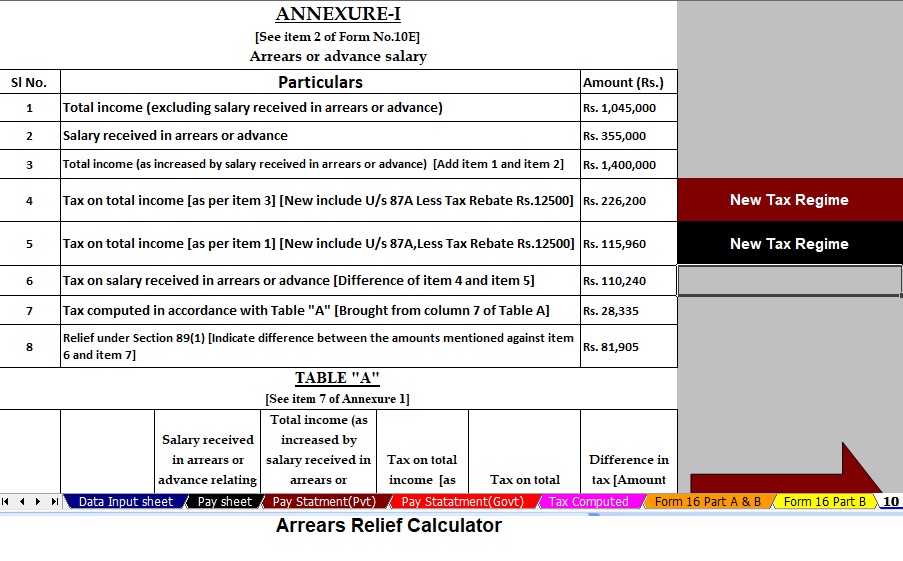
- Arrears relief calculation
- Salary structure sheet
- Automatic deductions entry
Moreover, it works without internet—helping both government and non-government employees.
7. How to Use the Excel Tax Calculator Step-by-Step
Step 1: Enter your basic salary details.
Step 2: Add allowances and deductions.
Step 3: Select your tax regime.
Step 4: View auto-generated tax summary.
Step 5: Download your ready-to-file statement.
Thus, with just a few clicks, your tax confusion disappears.
8. Why Salaried Employees Prefer Automation
Salaried professionals often have busy schedules. Therefore, automation frees them from manual spreadsheet calculations and ensures accuracy.
9. Difference Between Old and New Regime Benefits
Under the old regime, multiple exemptions exist. However, under the new regime, fewer exemptions apply but the Standard Deduction still reduces tax liability. Meanwhile, many taxpayers prefer whichever method produces maximum savings.
10. Example Calculations for Easy Understanding
Imagine your annual salary is ₹7,00,000. Because you now receive ₹75,000 as Standard Deduction, your taxable income reduces to ₹6,25,000 instantly. Furthermore, additional deductions can reduce it even more.
11. Common Mistakes in Manual Tax Calculations
Manual errors usually occur due to:
- Wrong slab selection
- Incorrect HRA calculations
- Misplaced decimal values
- Forgetting deductions
Hence, automation eliminates all these errors.
12. Why Standard Deduction Boosts Savings
Since the deduction is fixed and requires no proof, it offers guaranteed savings every year. Additionally, it benefits every salaried person equally, making it a fair tax relief method.
13. Key Income Tax Changes for FY 2025-26
This year, tax tweaks aim to reduce complexity and promote compliance. Therefore, the increased Income Tax Standard Deduction stands as the highlight.
14. Practical Tips to Maximise Tax Savings
- Always compare both regimes.
- Use the Excel calculator for accurate results.
- Plan investments early.
- Submit proofs on time.
Moreover, timely planning ensures a stress-free tax filing process.
15. Final Thoughts on Smart Tax Planning
The enhanced ₹75,000 Standard Deduction is a meaningful financial advantage. Plus, when you combine it with an Automatic Income Tax Calculator in Excel, your filing process becomes effortless, accurate, and faster. In short, smarter tools lead to smarter savings.
FAQs
- Who can claim the ₹75,000 Income Tax Standard Deduction?
All salaried employees and pensioners are eligible to claim it automatically. - Do I need documents to claim the Standard Deduction?
No, because it is fixed and automatic. - Does the Standard Deduction apply under both regimes?
Yes, it applies under both the old and new tax regimes. - Can Excel tax calculators be used by pensioners?
Yes, they are designed for both salaried individuals and pensioners. - Is manual calculation better than automated tools?
No, because automation reduces mistakes, saves time, and provides accurate
Download Automatic Income Tax Preparation Software All-in-One in Excel (F.Y. 2025–26) for Government and Non-Government Employees


Key Features of the Excel-Based Tax Preparation Utility
- Dual Regime Option:
You can effortlessly choose between the New or Old Tax Regime under Section 115BAC. Furthermore, the tool automatically compares both regimes to help you identify the most tax-saving option. - Customised Salary Structure:
It automatically adjusts according to your salary format, whether you belong to a Government or Non-Government organisation. Additionally, this customisation reduces manual entry and saves valuable time. - Automatic Arrears Relief Calculator [Section 89(1) + Form 10E]:
It accurately calculates arrears relief for the financial years ranging from 2000–01 to 2025–26. In addition, it instantly generates Form 10E for submission, ensuring precise tax relief computations. - Updated Form 16 (Part A & B):
This tool automatically generates Revised Form 16 (Part A & B) for the Financial Year 2025–26. Likewise, it ensures that your Form 16 remains compliant with the latest tax formats. - Simplified Compliance:
It ensures quick and error-free tax computation through advanced built-in formulas. Furthermore, you can confidently prepare your return with zero manual intervention, enhancing both speed and accuracy.