Introduction
Have you ever wished you could calculate your income tax without stress, confusion, or long hours hunting for formulas? If yes, you’re not alone. Millions of taxpayers face the same challenge every year, especially when the financial year changes. Fortunately, with the Automatic Income Tax Calculator All in One in Excel, your tax preparation for FY 2025-26 becomes as smooth as driving on a freshly paved highway. Therefore, think of this Excel tool as your personal tax GPS—guiding you clearly, quickly, and accurately.
Before we dive deep, let’s explore everything step-by-step.
When tax season arrives, most individuals search for a simple way to calculate their income tax without confusion or errors. Because of this need, the Automatic Income Tax Calculator in Excel emerges as a reliable and user-friendly choice. In other words, it processes your income, deductions, and tax rules instantly, and moreover, it ensures accurate results while saving precious time. Instead of depending on complex manual formulas, you simply enter numbers, and the tool computes everything in seconds. Consequently, you enjoy a smooth and stress-free tax experience.
1. However, Introduction to the Automatic Income Tax Calculator
The Automatic Income Tax Calculator in Excel uses built-in formulas to calculate your tax instantly. As soon as you enter your salary details, it processes your data immediately, and furthermore, it displays the tax you owe for FY 2025–26. Since the tool automates every step, you avoid mistakes, and additionally, you save time that you can use for more important tasks.
2. Why You Need an All-in-One Excel Tax Calculator
You may wonder why Excel remains one of the best platforms for tax calculation. First, it works offline, and therefore, you maintain full privacy over your financial information. Additionally, Excel gives you complete control, unlike online calculators that store data on external servers. Moreover, an Excel tax calculator remains accessible anytime—even during poor or no internet connectivity—making it a dependable solution.
3. Above all, the Features of the Excel Income Tax Calculator
This Excel-based tool includes several powerful features that simplify tax preparation:
• Automatic Tax Computation:
It calculates your tax liability instantly as you fill in your income details. Additionally, you don’t have to recheck formulas because the tool handles everything automatically.
• New & Old Tax Regime Support:
You can compare both regimes side by side, and consequently, you select the one that offers the maximum savings.
• Complete Deduction Coverage:
It includes deductions such as 80C, 80CCD(1B), 80D, NPS, HRA, and more. Moreover, it displays how each deduction affects your final tax.
• Salary Structure Support:
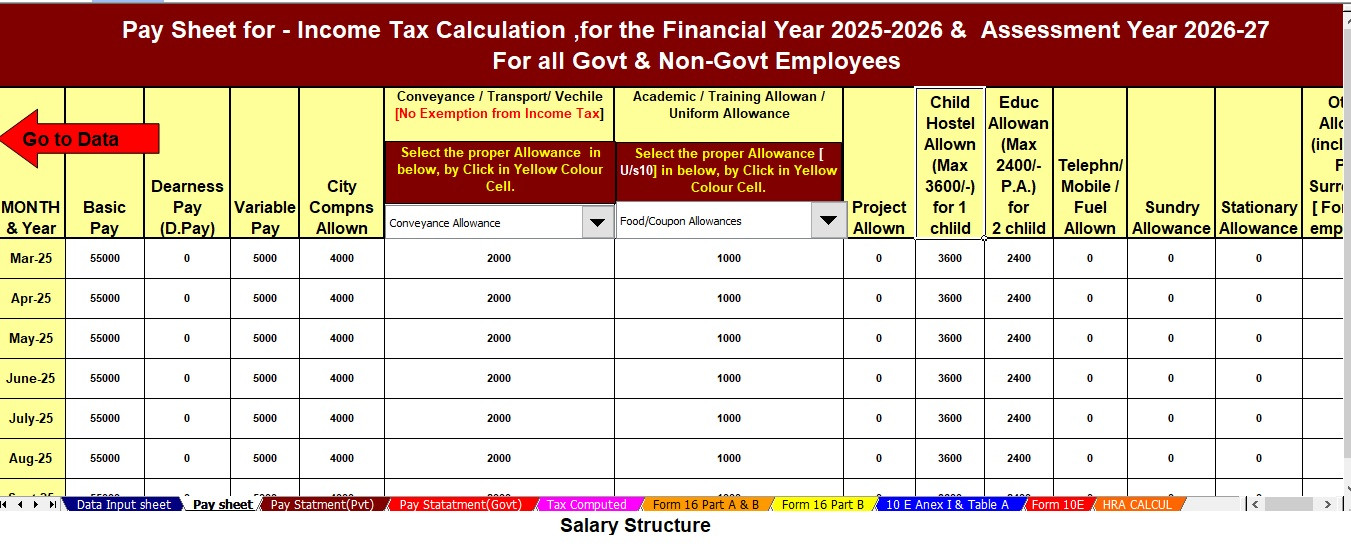
Whether your salary includes Basic Pay, DA, HRA, or multiple allowances, the tool handles everything smoothly.
• Clean, User-Friendly Dashboard:
Excel’s simple interface ensures that even beginners understand the layout easily. Furthermore, navigation becomes effortless because everything appears clearly organised.
4. How to Download the Calculator
Downloading the tool takes only a few seconds. First, you click the download link. Next, you save the file to your device. After that, you open it with Microsoft Excel. Finally, the calculator becomes ready for use without requiring installation or setup. As a result, anyone—even first-time users—can start immediately.
5. System Requirements
Even though this tool is lightweight, it requires a few basic things to run smoothly:
-
Microsoft Excel 2010 or later
-
Windows 7, 8, 10, or 11
-
At least 2 GB of RAM
-
Basic understanding of Excel
Additionally, the tool runs on laptops, desktops, and compatible tablets, making it versatile.
6. How to Use the Calculator Effectively
To get accurate results, follow these simple steps:
-
Enter your personal information.
-
Fill in your salary components accurately.
-
Add deductions available under sections like 80C, 80D, and housing loan interest.
-
Compare the Old and New Tax Regimes.
-
Download or print the final summary for reference.
Meanwhile, the calculator guides you step by step, and moreover, it ensures that you never miss important fields. After that, you simply review the results and finalise your tax plan. Finally, you complete your filing with confidence.
7. Benefits for Salaried Employees
Salaried individuals face multiple salary components—such as allowances, exemptions, and deductions. The Excel calculator simplifies everything instantly. Additionally, it identifies which regime helps you save more. Consequently, you avoid unnecessary taxes and maximise your eligible benefits. Furthermore, the preloaded formulas eliminate guesswork.
8. Benefits for Professionals & Pensioners
Professionals and pensioners also benefit greatly from this Excel tax tool. It processes income from freelancing, consultancy, and pensions effortlessly. Meanwhile, it supports detailed entry fields for additional earnings. Therefore, users from all backgrounds can rely on it, and moreover, they enjoy complete accuracy without paying for external services.
9. Comparison With Manual Tax Calculation
Manual calculation often feels like climbing a steep hill—you can finish it, but the process drains your time and energy. In contrast, using an Excel calculator feels like taking a cable car to the top—quick, smooth, and accurate. Furthermore, manual calculations carry the risk of errors, while the tool eliminates these risks completely. Hence, the Excel-based method becomes the smarter and safer option.
10. Understanding FY 2025–26 Tax Rules
Tax rules change frequently, and therefore, staying updated becomes essential. Fortunately, this calculator includes the latest tax slabs, deduction limits, and exemption rules for FY 2025–26. Additionally, it adjusts values automatically, and moreover, it reflects accurate tax numbers based on your inputs.
11. New vs Old Tax Regime
Choosing between the two regimes can confuse many taxpayers. That’s why this Excel tool displays:
-
Your total tax liability under each regime
-
Eligible deductions
-
Potential savings
As a result, you make an informed decision. Furthermore, the side-by-side comparison ensures excellent clarity.
12. Common Mistakes Taxpayers Make
Many taxpayers accidentally:
-
Miscalculate HRA or exemptions
-
Skip eligible deductions
-
Use outdated tax slabs
-
Enter incorrect figures
These mistakes cause financial losses. Additionally, they complicate your filing process unnecessarily. Therefore, avoiding them becomes crucial.
13. How This Excel Tool Helps Avoid Errors
Because every calculation is automated, the tool prevents human errors effectively. Moreover, it validates entries, checks value limits, and instantly flags issues. Consequently, you file your tax return confidently. Additionally, the guided layout ensures that you complete each step correctly.
14. Security & Data Privacy
Unlike online calculators, this Excel tool operates fully offline. Therefore, your financial data never leaves your system. Additionally, you avoid risks associated with data tracking or server storage. Hence, you maintain complete privacy and control.
15. Final Thoughts
To conclude, the Automatic Income Tax Calculator All-in-One in Excel for FY 2025–26 provides a simple, accurate, and secure way to calculate taxes. It saves time, prevents mistakes, and moreover, helps you choose the right tax regime. Furthermore, it supports every income type—salaried, professional, or pension-based—making it an excellent choice for all taxpayers. Ultimately, the tool transforms tax filing into a quick, reliable, and stress-free experience.
Frequently Asked Questions (FAQs)
1. How do I download the Automatic Income Tax Calculator in Excel for FY 2025–26?
You simply click the provided download link, save the file, and open it using Excel.
2. Is this Income Tax Calculator in Excel beginner-friendly?
Yes, the calculator uses a clean and simple design that beginners understand easily.
3. Can I compare the New and Old Tax Regimes using this tool?
Absolutely. The Excel sheet shows a clear side-by-side comparison.
4. Does the calculator work offline?
Yes, it works entirely offline, ensuring complete privacy.
5. Is my financial data safe in the Excel calculator?
Yes, because your data stays on your device, ensuring full security.
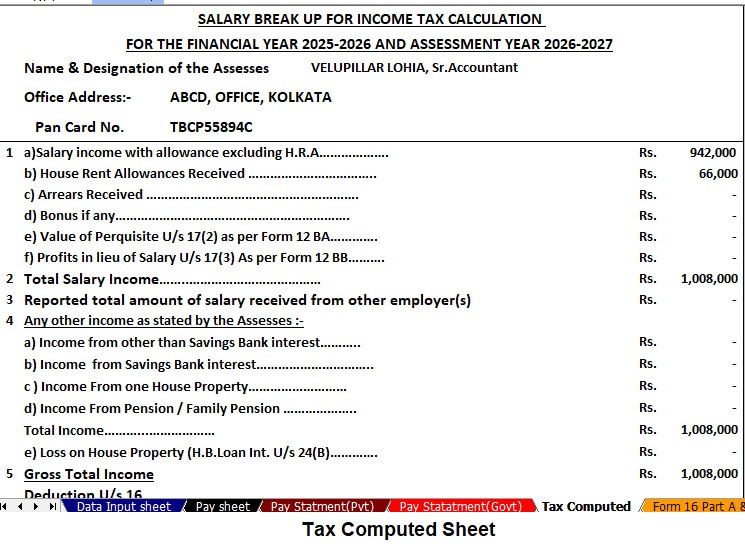
Download and Prepare Automatic at a time Tax Computed Sheet + Salary Structure + Form 10E for FY 2025-26 + H.R.A. Calculation U/s 10(13A) + Automatic Form 16 Part B and Part A & B Automatic Income Tax Preparation Software in Excel (F.Y. 2025–26) for Government and Non-Government Employees


Key Features of the Excel-Based Tax Preparation Utility
1. Dual Regime Option:
You easily choose between the New or Old Tax Regime under Section 115BAC; moreover, the tool automatically compares both regimes and shows you the most tax-saving option. Additionally, it guides you quickly through the selection process.
2. Customised Salary Structure:
The software automatically adjusts to your salary structure, whether you work in a Government or Non-Government organisation. Furthermore, this customisation reduces manual entries, and likewise, it saves you valuable time. In addition, the organised format improves accuracy.
3. Automatic Arrears Relief Calculator [Section 89(1) + Form 10E]:
The tool accurately calculates arrears relief for financial years from 2000–01 to 2025–26; next, it instantly generates Form 10E for submission. Furthermore, it ensures precise and compliant tax-relief computations.
4. Updated Form 16 (Part A & B and Part B):
The software automatically generates Revised Form 16 (Part A & B and Part B) for F.Y. 2025–26. Likewise, it keeps your Form 16 fully updated with the latest tax formats. Also, the tool ensures consistency across all sections.
5. Simplified Compliance:
The utility ensures quick, accurate, and error-free tax computation through advanced built-in formulas. Then, it allows you to prepare your return confidently with zero manual intervention. Finally, it enhances both speed and overall accuracy.
6. Seamless Data Entry and Navigation:
The software guides you through every section step by step; moreover, it simplifies data entry with user-friendly fields. Additionally, it highlights required inputs clearly, and in addition, it reduces the chances of missing important information. Likewise, you can move across sheets effortlessly without any confusion.
7. Built-In Validation Checks:
The tool actively verifies your entries and instantly flags incorrect or incomplete data. Furthermore, it ensures that you follow tax rules correctly, and moreover, it prevents common mistakes that usually occur during manual calculation. Also, the built-in checks improve both precision and compliance.
8. Automatic Calculation of Deductions and Exemptions:
The software calculates deductions such as 80C, 80CCD(1B), 80D, HRA, and other allowances automatically. Additionally, it updates all formulas according to the latest tax rules; likewise, it ensures that you receive the maximum eligible benefit. Moreover, the automated system eliminates the need for complex manual calculations.
9. User-Friendly Output Reports:
The tool generates clean, organised, and printable tax statements for your records. Furthermore, it presents everything in a clear and structured layout, and likewise, it allows you to download or print the final summary instantly. Additionally, these reports make tax filing smooth and stress-free.
10. Fully Offline and Secure Operation:
You work with complete privacy because the software operates entirely offline. Moreover, it protects your personal financial data from online security risks. Additionally, it ensures that your tax files remain accessible anytime without internet dependency. Likewise, you experience a safer and more controlled environment for tax preparation.